Simulation

Wednesday May 20

Today we will…

  • Simulation
    • Statistical Distributions
    • Simulating Data
    • Iterating Random Processes
  • PA 8.2: Instrument Con

Project Checkpoint

  • For checkpoint 3 you will turn in a partially complete lab with at least:
    • a preamble that describes the data
    • three question (one related to week 7 or after)
  • Reminder: references
    • keep track of all outside resources
    • provide links to generative AI “conversations”

Simulations – Big Picture

  • “simulation” is a broad term…
  • In statistics, we will typically think of simulation as involving some form of randomness/stochasticity
  • In this class, we will consider:
    • Generating synthetic/simulated data from probability distributions
    • Repeating random processes many times to understand their long-term behavior

Statistical Distributions

Statistical Distributions

Recall from your statistics classes…

A random variable is a value we don’t know until we observe an instance.

  • Coin flip: could be heads (0) or tails (1)
  • Person’s height: could be anything from 0 feet to 10 feet.
  • Annual income of a US worker: could be anything from $0 to $1.6 billion

The distribution of a random variable tells us its possible values and how likely they are.

  • Coin flip: 50% chance of heads and tails.
  • Heights follow a bell curve centered at 5 foot 7.
  • Most American workers make under $100,000.

Statistical Distributions with Names!

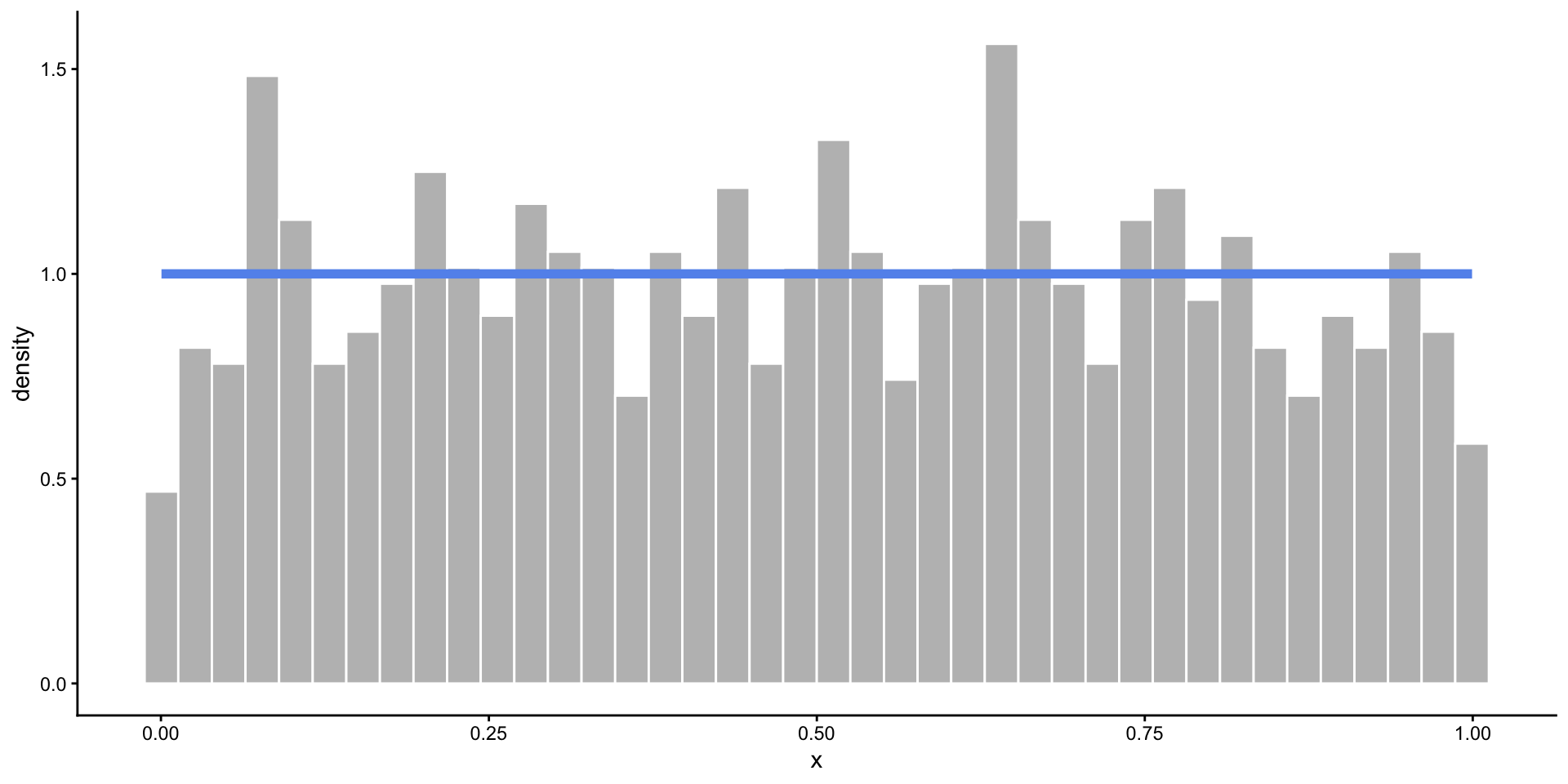
Uniform Distribution

  • When you know the range of values, but not much else.
  • All values in the range are equally likely to occur.
  • Defined by minimum and maximum values: \(Unif(a, b)\)

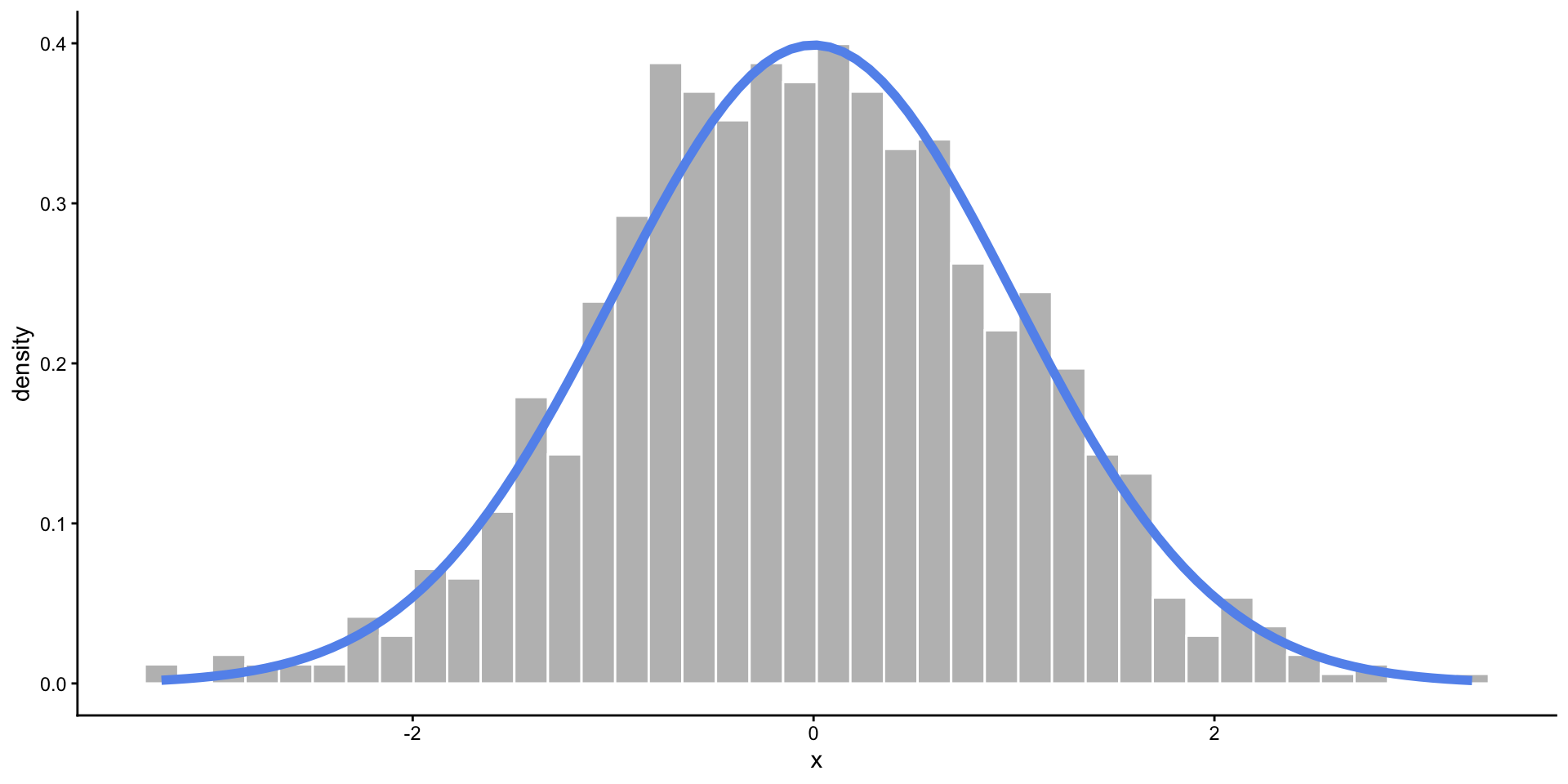
Normal Distribution

  • When you expect values to fall near the center.
  • Frequency of values follows a bell shaped curve.
  • Defined by mean and standard deviation (or variance): \(N(\mu, \sigma^2)\)
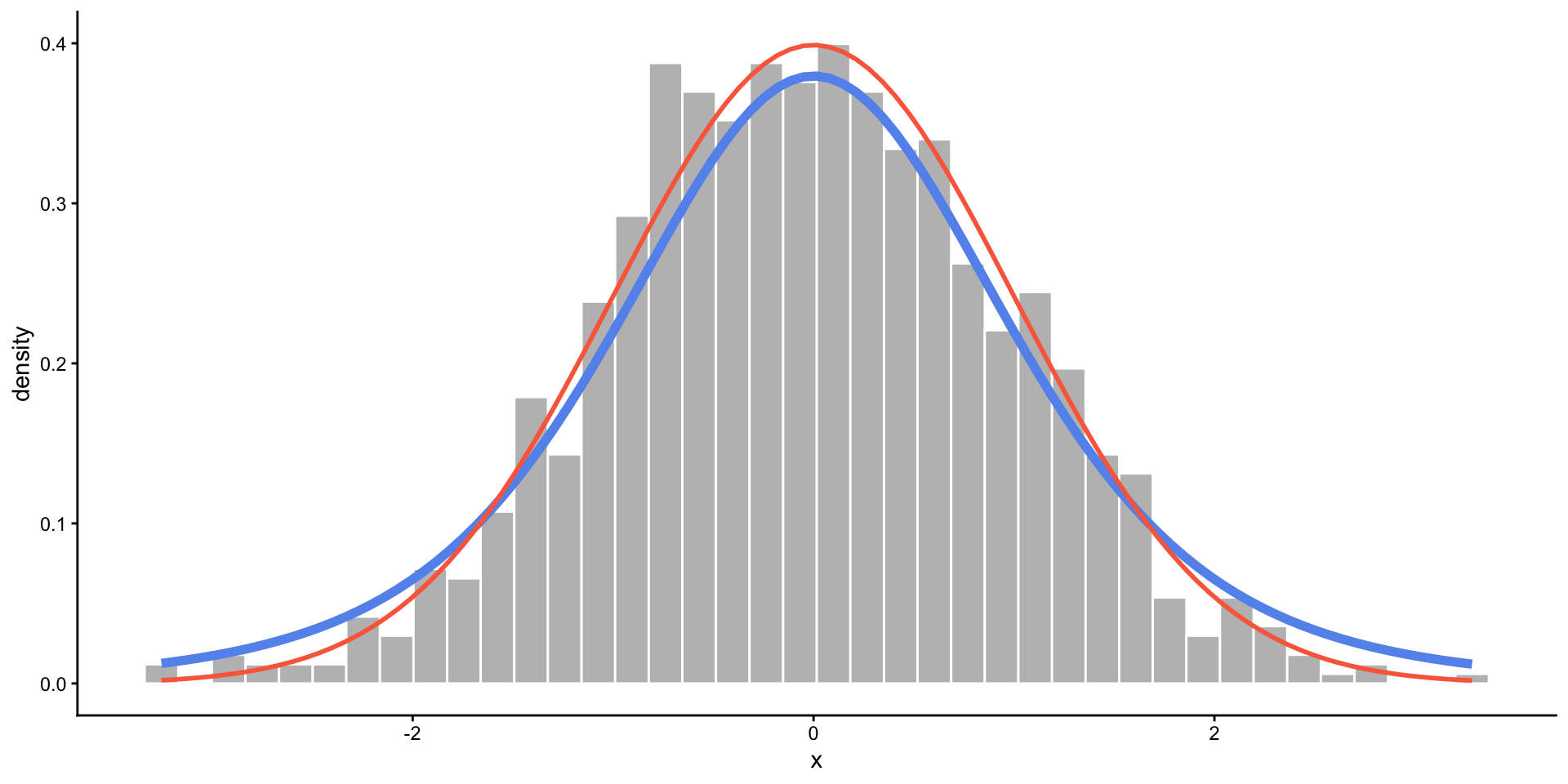
t-Distribution

  • A slightly wider bell curve.
  • Basically used in the same context as the normal distribution, but more common with real data (when the standard deviation is unknown).
  • Defined by degrees of freedom: \(t(df)\)
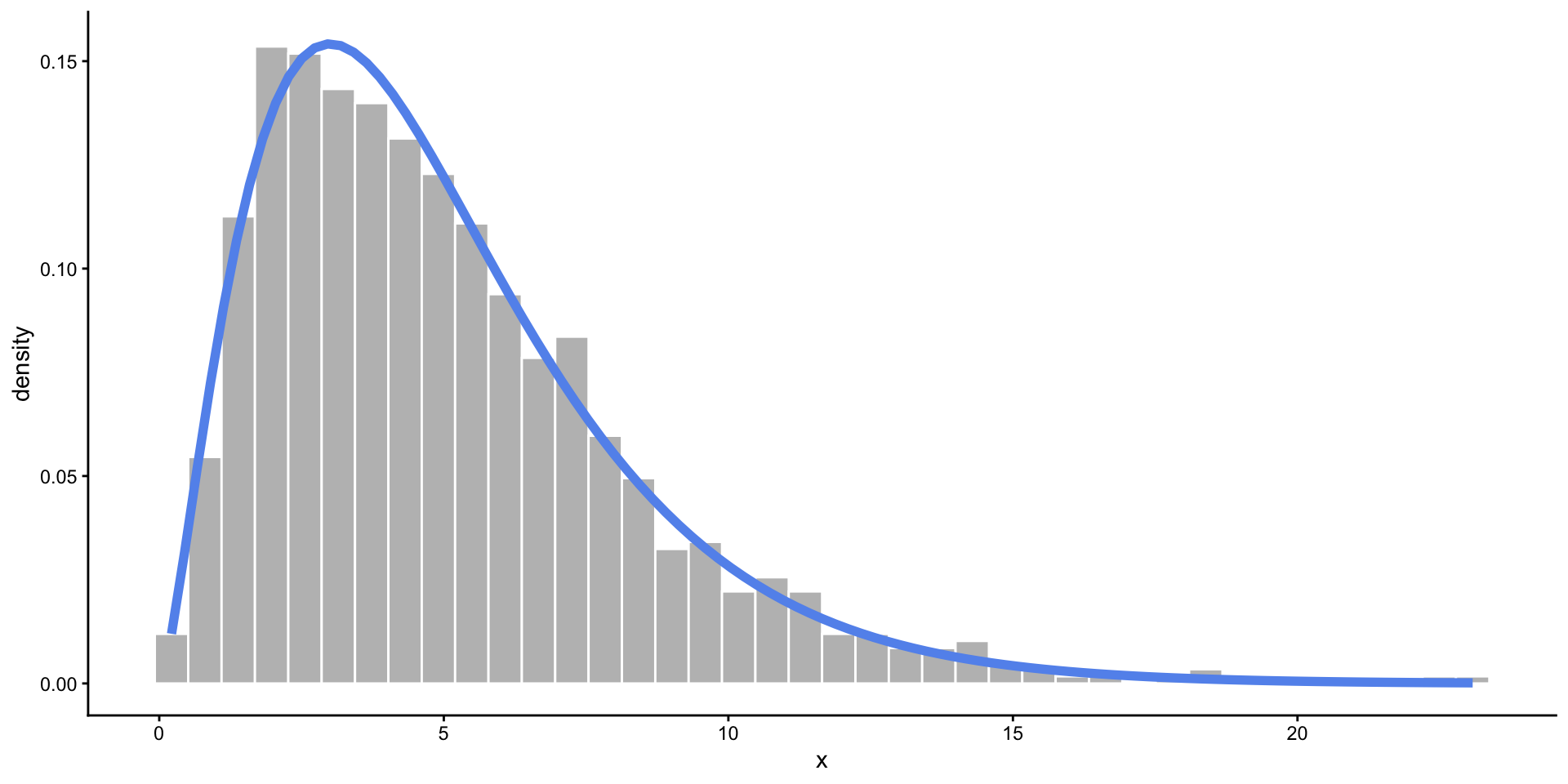
Chi-Square Distribution

  • Somewhat skewed, and only allows values above zero.
  • Commonly used in statistical testing.
  • Defined by degrees of freedom: \(\chi^2_{df}\)
Binomial Distribution

  • There are two possible outcomes, and you are counting how many times one of the outcomes (“success”) occurred out of a fixed number of trials.
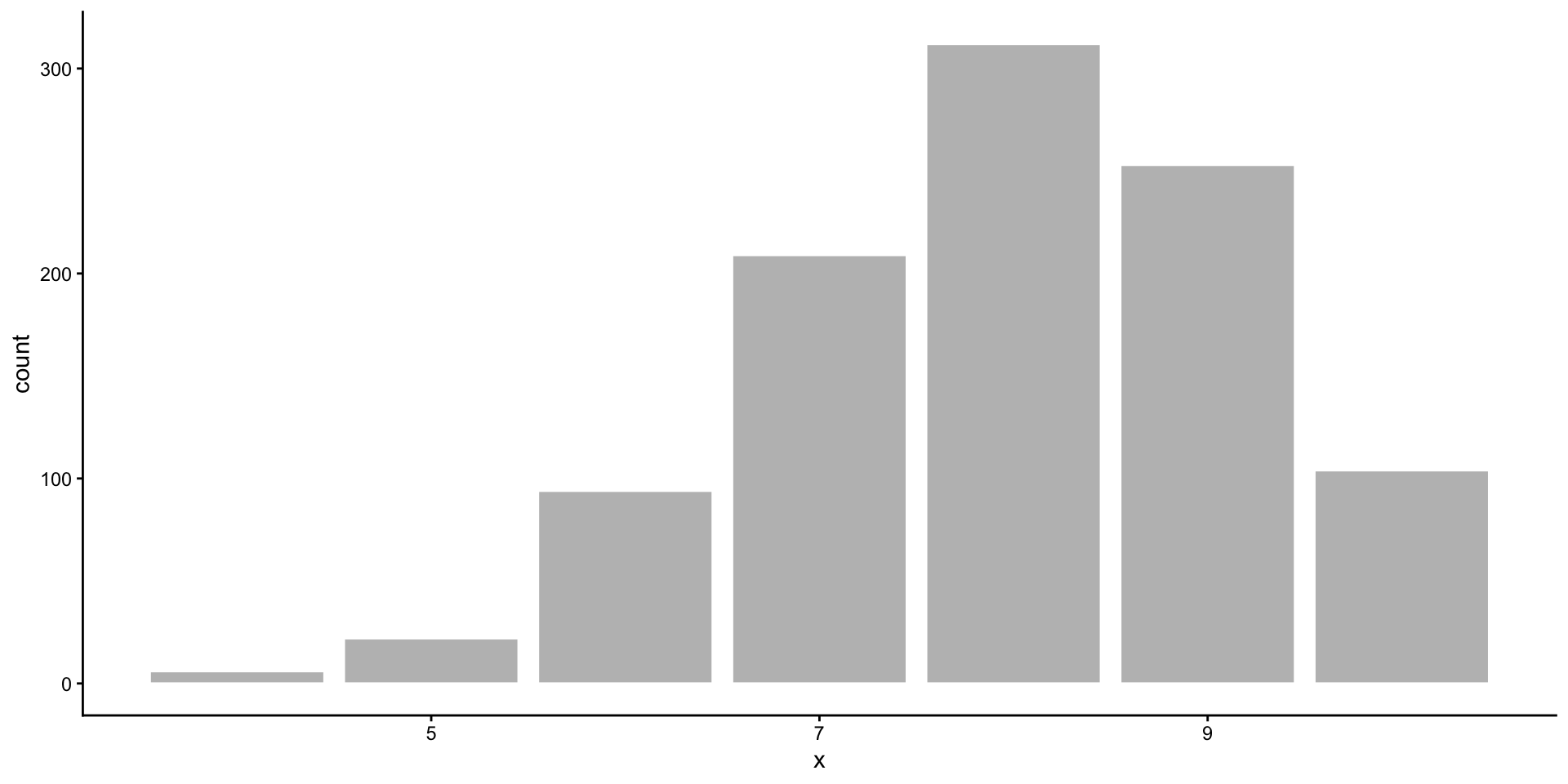
  • Takes discrete values from 0 to the number of trials.
  • Defined by the number of trials (\(n\)) and the probability of success (\(p\)): \(Binom(n, p)\)

How do we use distributions?

  • Find the probability of an event.
    • If I flip 10 coins, what are the chances I get all heads?
  • Estimate a proportion of a population.
    • About what proportion of people are above 6 feet tall?
  • Quantify the evidence in your data.
    • In my survey of 100 people, 67 said they were voting for Measure A. How confident am I that Measure A will pass?

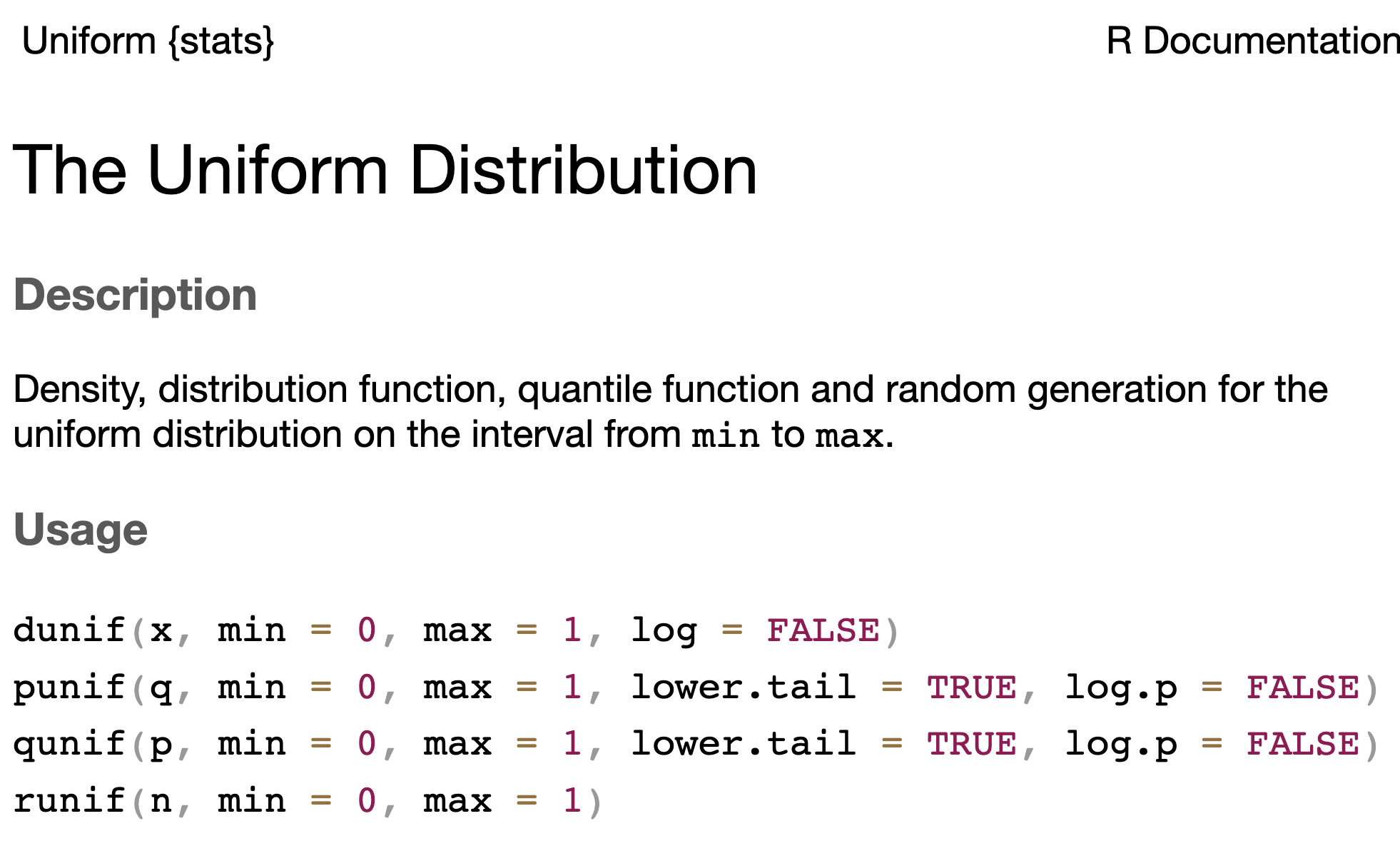
Distribution Functions in R

  • There are four functions for each of these distributions to accomplish different tasks!
  • The parameters that define each distribution are arguments
    • e.g. min and max for the Uniform distribution
  • Documentation can be found for each distribution
Distribution Functions in R

r is for random sampling.

  • Generate n random values from a distribution.
  • We use this to simulate data (create pretend observations).
runif(n = 3, min = 10, max = 20)
[1] 16.92139 18.04868 14.02135
rnorm(n = 3)
[1]  1.6698102  0.4636894 -0.5901209
rnorm(n = 3, mean = -100, sd = 50)
[1]  -25.23379 -129.34119  -73.10600
rt(n = 3, df = 11)
[1] -0.7259724  0.6612374 -0.4653897
rbinom(n = 3, size = 10, prob = 0.7)
[1] 8 4 5
rchisq(n = 3, df = 11)
[1] 11.272748  5.271973  6.008911

p is for probability.

  • Compute the chances of observing a value less than x: \(P(X < x)\)
  • We use this for calculating p-values.
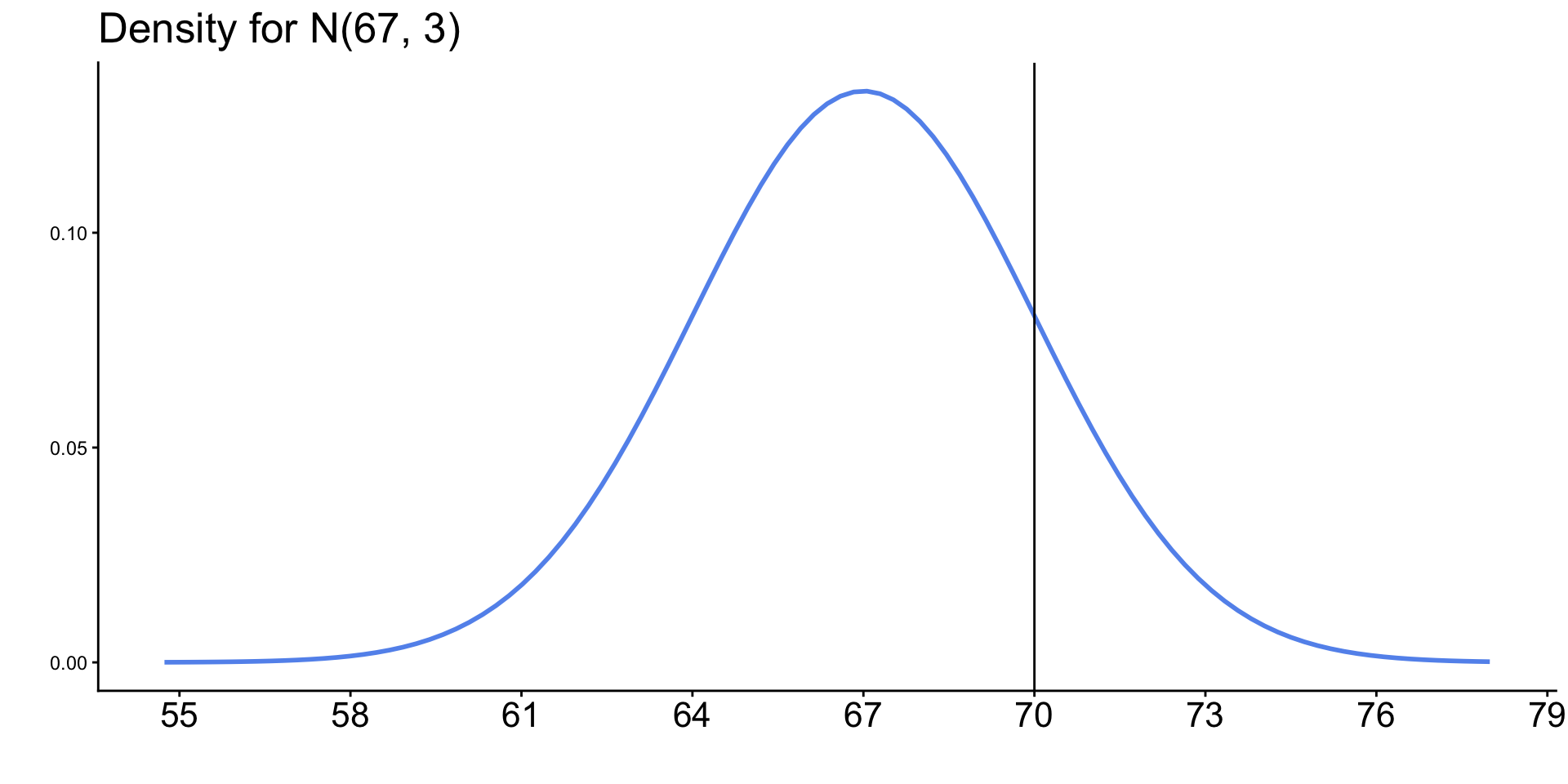
pnorm(q = 70, mean = 67, sd = 3)
[1] 0.8413447
1 - pnorm(q = 70, mean = 67, sd = 3)
[1] 0.1586553
pnorm(q = 70, mean = 67, sd = 3, lower.tail = FALSE)
[1] 0.1586553

q is for quantile.

  • Given a probability p, compute \(x\) such that \(P(X < x) = p\).
  • The q functions are “backwards” of the p functions.
  • We use this for calculating critical values (z*).
qnorm(p = 0.95)
[1] 1.644854
qnorm(p = 0.95, mean = 67, sd = 3)
[1] 71.93456

d is for density.

  • Compute the height of a distribution curve at a given x.
  • For discrete dist: probability of getting exactly x.
  • For continuous dist: usually meaningless.
  • Mostly useful for plotting the distribution!

Probability of exactly 12 heads in 20 coin tosses, with a 70% chance of tails?

dbinom(x = 12, size = 20, prob = 0.3)
[1] 0.003859282

Empirical vs. Theoretical Distributions

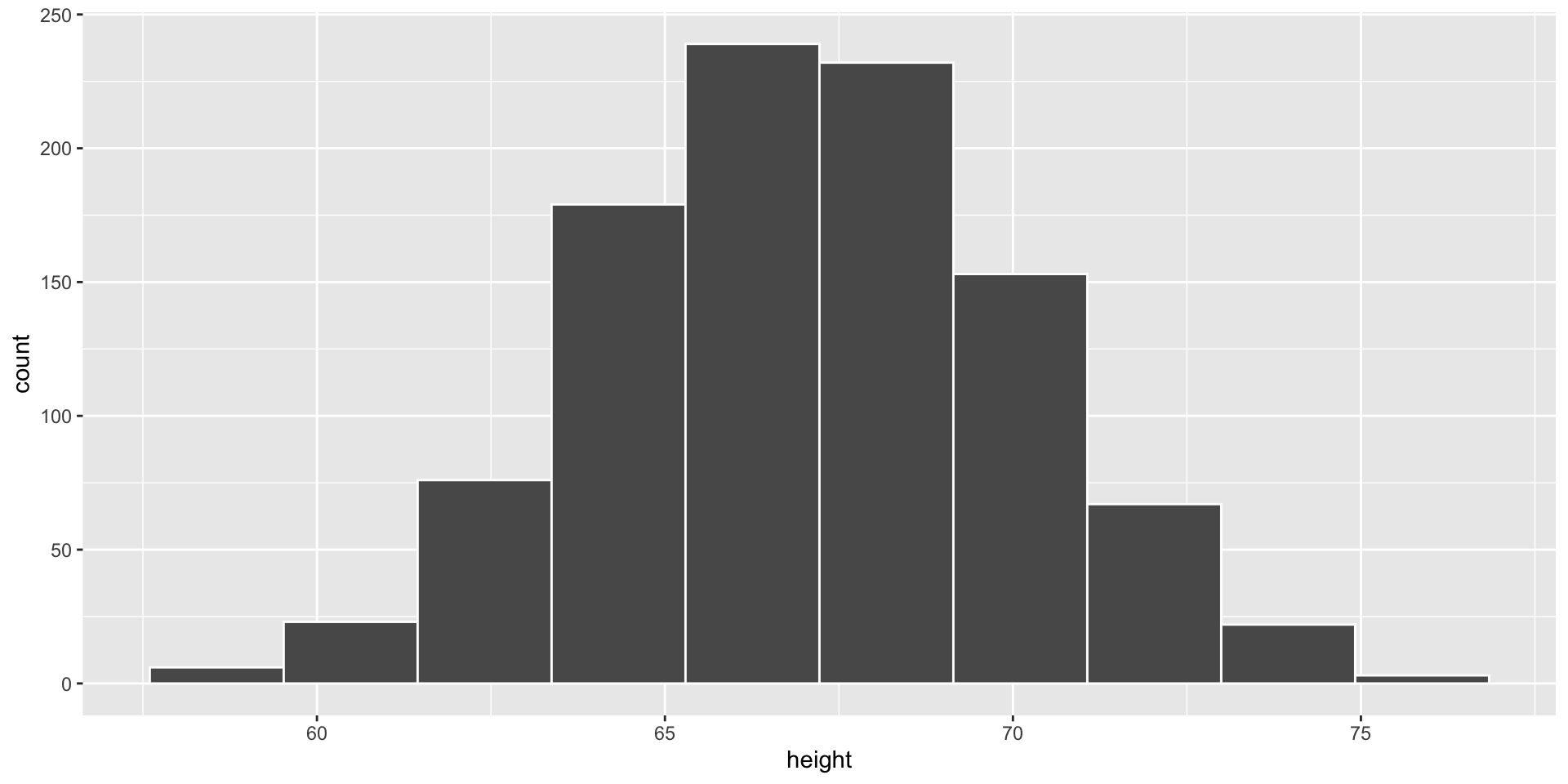
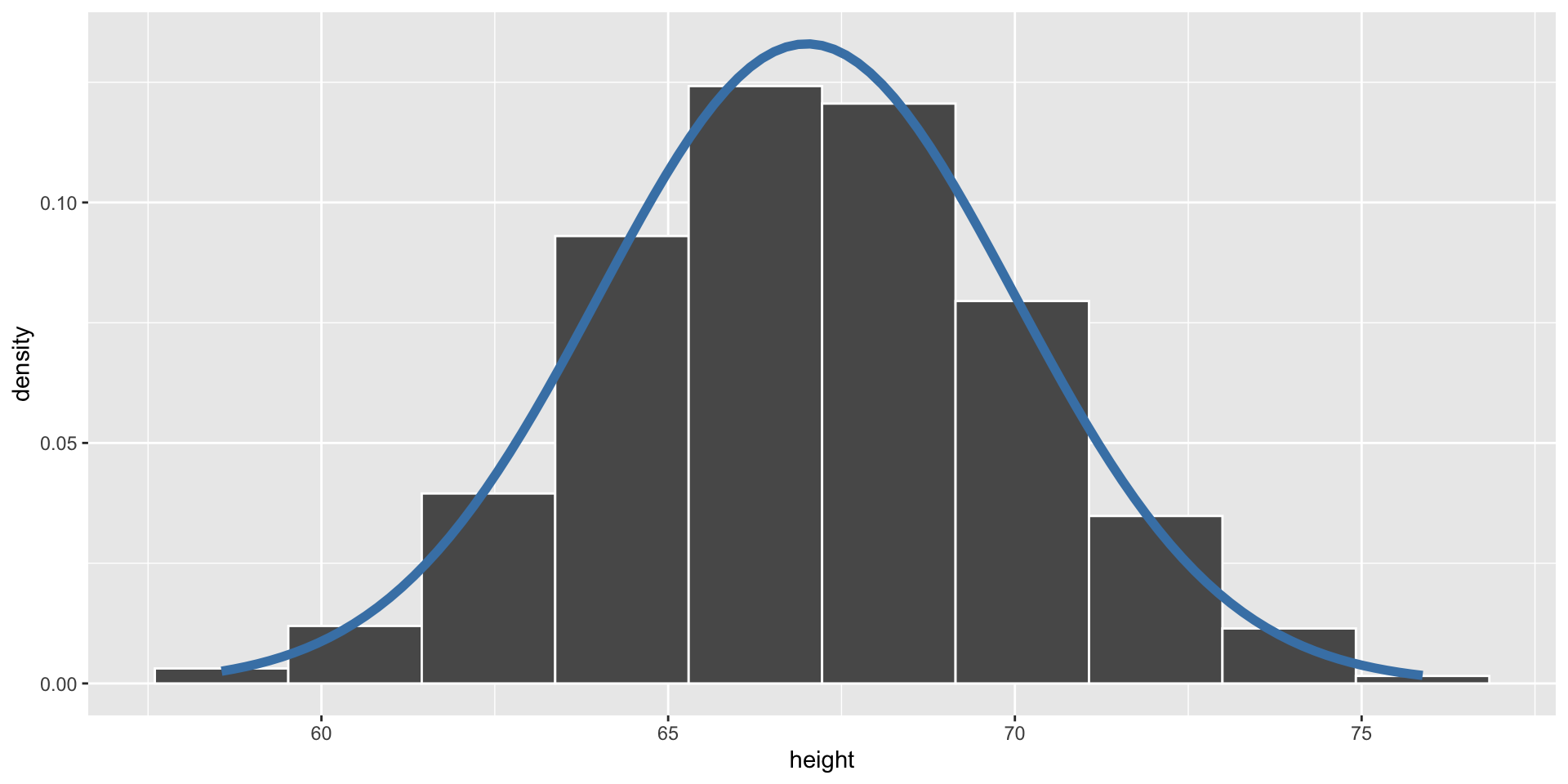
Empirical: the observed data.
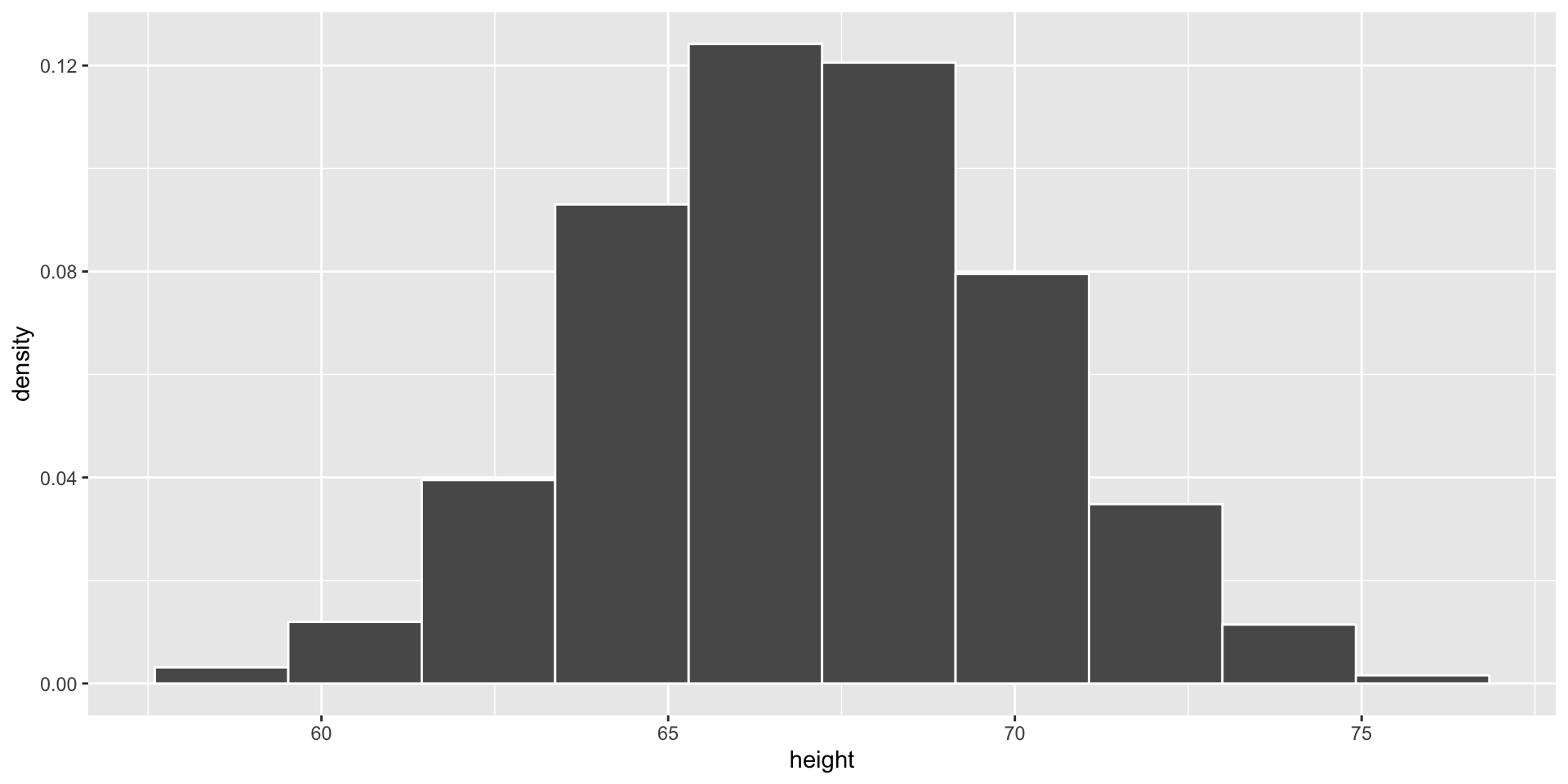
Code
data %>%
  ggplot(aes(x = height)) +
  geom_histogram(aes(y = after_stat(density)), 
                 bins = 10, 
                 color = "white") 

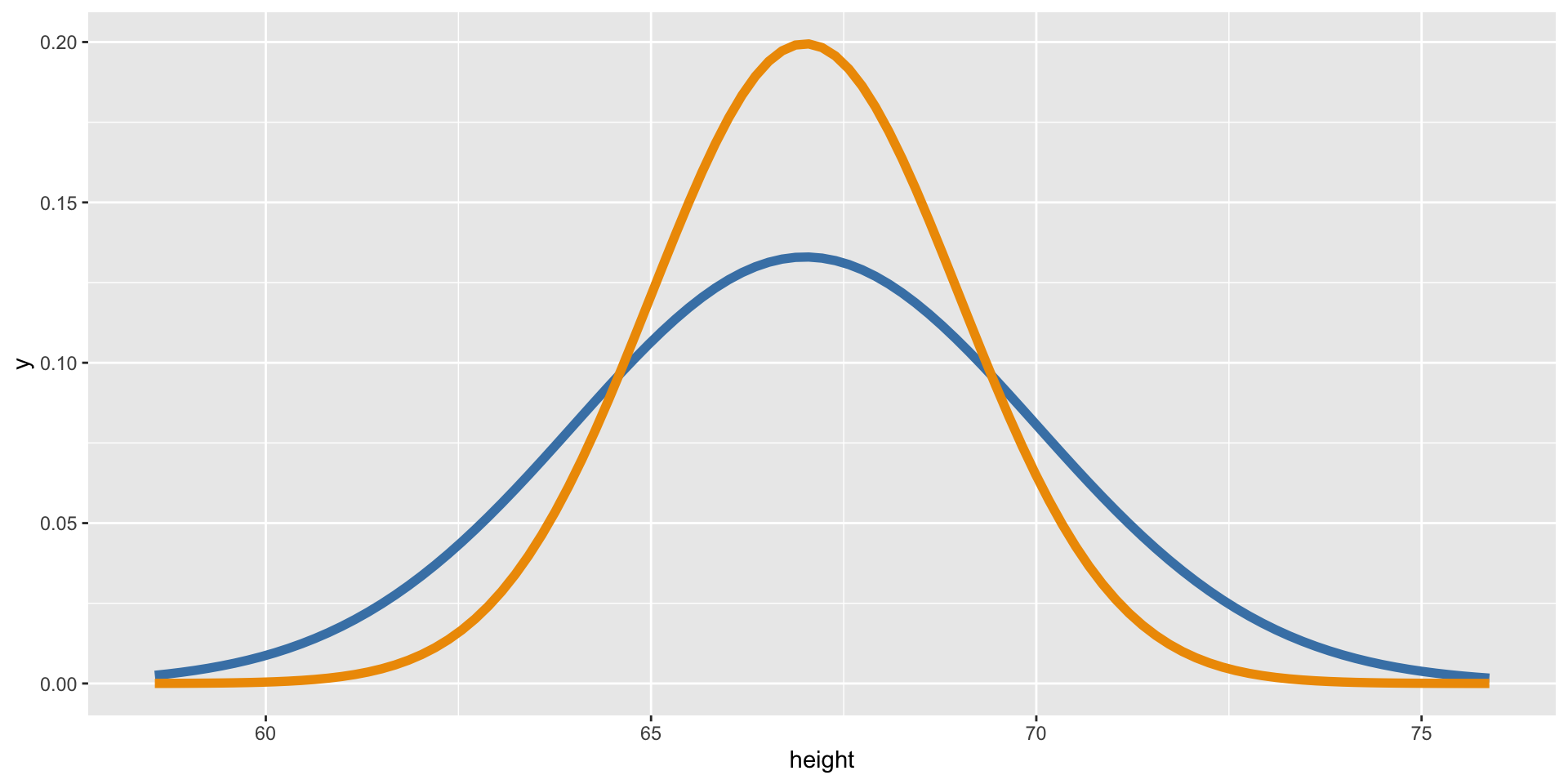
Theoretical: the distribution curve.

Code
data %>%
  ggplot(aes(x = height)) +
  stat_function(fun = ~dnorm(.x, mean = 67, sd = 3),
                col = "steelblue", lwd = 2) +
  stat_function(fun = ~dnorm(.x, mean = 67, sd = 2),
                col = "orange2", lwd = 2)

Plotting Both Distributions

data |> 
  ggplot(aes(x = height)) +
  geom_histogram(bins = 10, color = "white")

  1. Plot your data.
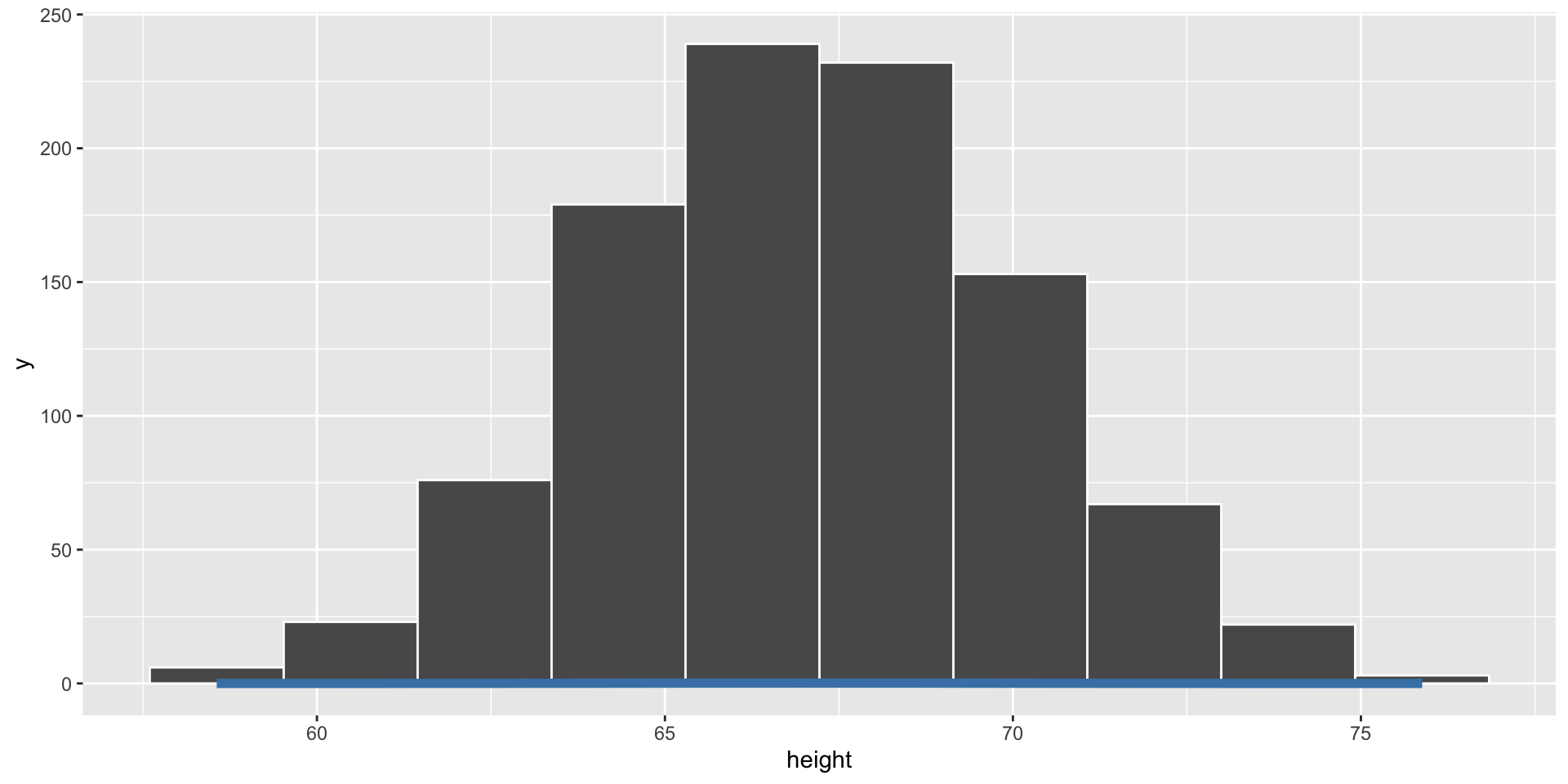
data |> 
  ggplot(aes(x = height)) +
  geom_histogram(bins = 10, color = "white") +
  stat_function(fun = ~ dnorm(.x, mean = 67, sd = 3),
                color = "steelblue", lwd = 2)

  1. Add a density curve.
data |> 
  ggplot(aes(x = height)) +
  geom_histogram(aes(y = after_stat(density)),
                 bins = 10, color = "white") +
  stat_function(fun = ~ dnorm(.x, mean = 67, sd = 3),
                color = "steelblue", lwd = 2)

  1. Change the y-axis of the histogram to match the y-axis of the density.

Simulation - Sampling From Probability Distributions

Generating Simulated Data - The Idea

  • We can generate fake (“synthetic”) data based on the assumption that a variable follows a certain distribution.

  • We randomly sample observations from the distribution.

age <- runif(1000, min = 15, max = 75)

Reproducible samples: set.seed()

Since there is randomness involved, we will get a different result each time we run the code.

runif(3, min = 15, max = 75)
[1] 50.72983 66.67432 68.35707
runif(3, min = 15, max = 75)
[1] 67.11051 25.35165 35.57557


To generate a reproducible random sample, we first set the seed:

set.seed(94301)

runif(3, min = 15, max = 75)
[1] 59.68333 30.27768 38.29962
set.seed(94301)

runif(3, min = 15, max = 75)
[1] 59.68333 30.27768 38.29962

Whenever you are doing an analysis that involves a random element, you should set the seed!

Simulate a Dataset

set.seed(435)
fake_data <- tibble(names   = charlatan::ch_name(1000),
        height  = rnorm(1000, mean = 67, sd = 3),
        age     = runif(1000, min = 15, max = 75),
        measure = rbinom(1000, size = 1, prob = 0.6)) |> 
  mutate(supports_measure_A = ifelse(measure == 1, "yes", "no"))
head(fake_data) 
names height age measure supports_measure_A
Elbridge Kautzer 67.43632 66.29460 1 yes
Brandon King 64.99480 61.53720 0 no
Phyllis Thompson 68.09035 53.83715 1 yes
Humberto Corwin 67.45541 33.87560 1 yes
Theresia Koelpin 71.37196 16.12199 1 yes
Hayden O'Reilly-Johns 66.17853 36.96293 0 no

Check to see the ages look uniformly distributed.
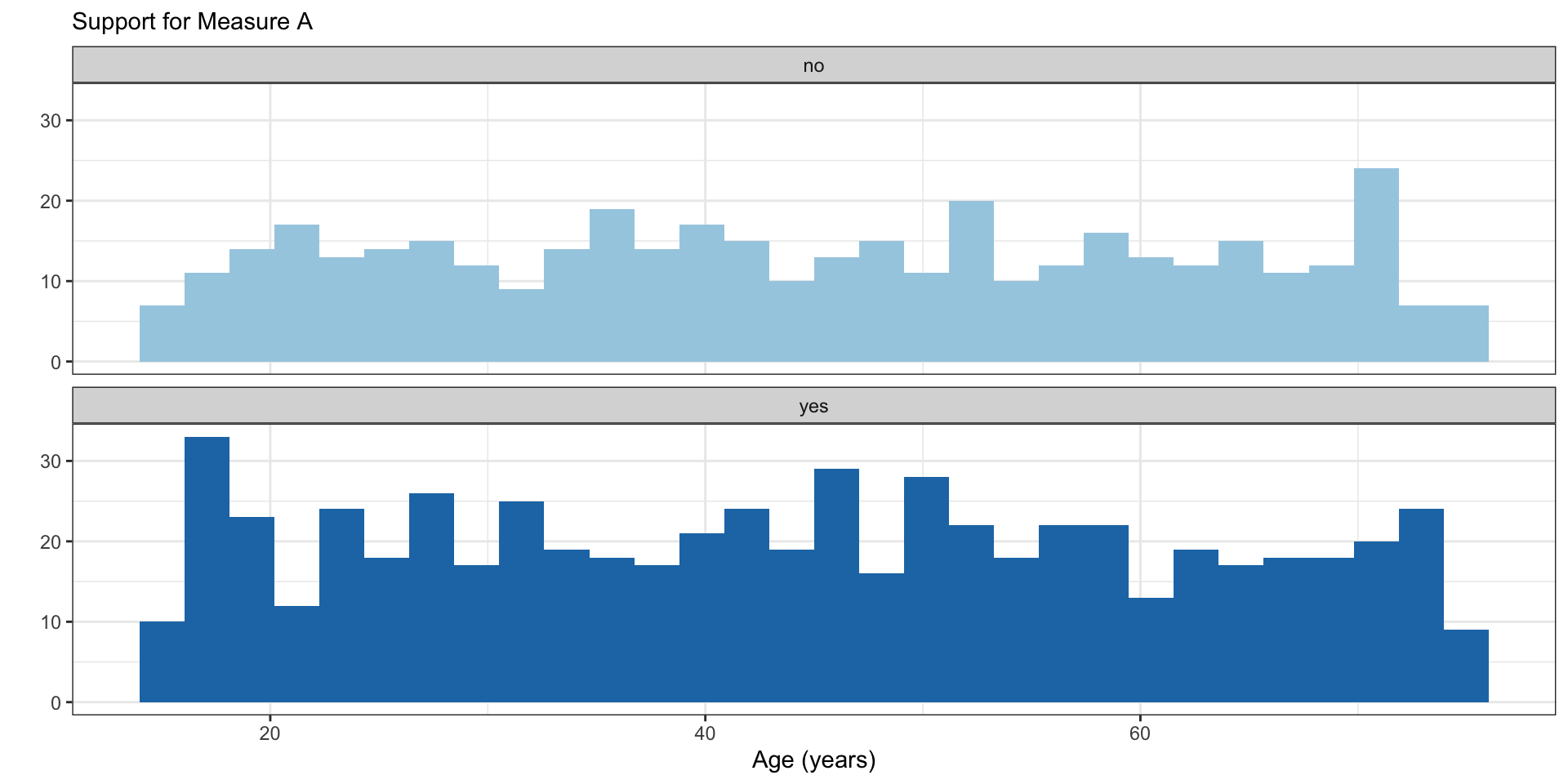
Code
fake_data |> 
  ggplot(aes( x = age,
             fill = supports_measure_A)) +
  geom_histogram(show.legend = F) +
  facet_wrap(~ supports_measure_A,
             ncol = 1) +
  scale_fill_brewer(palette = "Paired") +
  theme_bw() +
  labs(x = "Age (years)",
       y = "",
       subtitle = "Support for Measure A",)

Simulation - Random Samples from a Fixed Population

Draw a Random Sample

Use sample() to take a random sample of values from a vector.

my_vec <- c("dog", "cat", "bunny", "horse", "goat", "chicken")

sample(x = my_vec, size = 3)
[1] "horse"   "cat"     "chicken"
set.seed(1)
sample(x = my_vec, size = 5, replace = T)
[1] "dog"   "horse" "dog"   "cat"   "goat" 
sample(c(0, 1), size = 10, 
       prob = c(.8, .2), replace = T)
 [1] 1 0 0 0 0 0 0 0 0 0

Warning

Whenever you take a sample, think about if you want to take a sample with or without replacement. The default is to sample without replacement.

Draw a Random Sample

Use slice_sample() to take a random sample of observations (rows) from a dataset.

fake_data |> 
  slice_sample(n = 3) 
names height age measure supports_measure_A
Alexander Nicolas 60.78593 25.87201 0 no
Marnie Witting 67.55575 48.26608 1 yes
Liddie Wiza-Pouros 66.36513 29.91378 1 yes
fake_data |> 
  slice_sample(prop = .005) 
names height age measure supports_measure_A
Debera Kirlin 70.01628 20.18689 0 no
Demario Muller 69.03207 34.78672 1 yes
Alvera Mayert 66.06743 57.62611 0 no
Dr. Duwayne Gleichner 64.79083 31.31543 0 no
Dr. Bethany Fisher 71.70982 33.81118 1 yes

Simulation – Iterating Random Processes

Example: Birthday Simulation

Suppose there is a group of 50 people.

  • Simulate the approximate probability that at least two people have the same birthday (same day of the year, not considering year of birth or leap years).

Example: Birthday Simulation

Write a function to …

  • … simulate the birthdays of n random people (assuming it is equally likely to be born any day of the year).
  • … count how many birthdays are shared.
  • … return whether or not a shared birthday exists.
bday_prob <- function(n = 50){
  bday_data <- tibble(person = 1:n,
                      bday   = sample(1:365, size = n, replace = T))
  
  double_bdays <- bday_data |> 
    count(bday) |> 
    filter(n >= 2) |> 
    nrow()
  
  return(double_bdays > 0)
}

Example: Birthday Simulation

Use a map() function to repeat this simulation 1,000 times.

  • What proportion of the iterations contain at least two people with the same birthday?
sim_results <- map_lgl(.x = 1:1000,
                       .f = ~ bday_prob(n = 50))

mean(sim_results)
[1] 0.969

In-line Code

We can automatically include code output in the written portion of a Quarto document using `r `.

  • This ensures reproducibility when you have results from a random generation process.
mean(sim_results)
[1] 0.969

Type this: `r mean(sim_results)*100`% of the iterations contain at least two people with the same birthday.

To get this: 96.9% of the iterations contain at least two people with the same birthday.

Simulating Multiple Datasets

Simulate Multiple Datasets - Step 1

Write a function to simulate height data from a population with some mean and SD height.

The user should be able to input:

  • how many observations to simulate
  • the mean and standard deviation of the Normal distribution to use when simulating
sim_ht <- function(n = 200, avg, std){
  
  tibble(person = 1:n,
         ht = rnorm(n = n, mean = avg, sd = std))
  
}
sim_ht(n = 5, 
        avg = 66, 
        std = 3)
# A tibble: 5 × 2
  person    ht
   <int> <dbl>
1      1  64.8
2      2  64.4
3      3  65.4
4      4  65.2
5      5  67.6

Simulate Multiple Datasets - Step 2

Create a set of parameters (mean and SD) for each population.

crossing(mean_ht = seq(from = 60, to = 78, by = 6),
         std_ht  = c(3, 6))
# A tibble: 8 × 2
  mean_ht std_ht
    <dbl>  <dbl>
1      60      3
2      60      6
3      66      3
4      66      6
5      72      3
6      72      6
7      78      3
8      78      6

Simulate Multiple Datasets - Step 3

Goal: Simulate datasets with all of these different parameters.

In other words, we want to iterate across all of these parameter combinations.

Sounds like a job for purrr!

The pmap() Family

These functions take in a list of vectors and a function.

  • The function must accept a number of arguments equal to the length of the list,
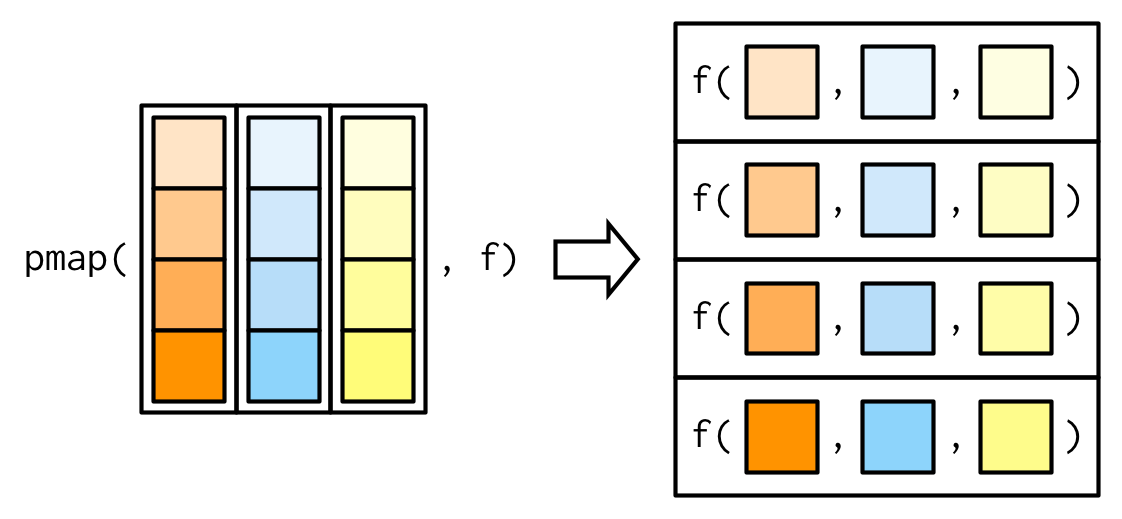
The pmap() Family

The vectors need to have the same names as the arguments of the function you are applying.

fruit <- data.frame(string = c("apple", "banana", "cherry"),
                    pattern = c("p", "n", "h"),
                    replacement = c("P", "N", "H"))
fruit
  string pattern replacement
1  apple       p           P
2 banana       n           N
3 cherry       h           H
pmap(.l = fruit,
     .f = str_replace_all)
[[1]]
[1] "aPPle"

[[2]]
[1] "baNaNa"

[[3]]
[1] "cHerry"

Simulate Multiple Datasets - Step 3

Simulate datasets with different mean and SD heights.

crossing(mean_ht = seq(from = 60, to = 78, by = 6),
         std_ht  = c(3, 6)
         ) |> 
 mutate(ht_data = pmap(.l = list(avg = mean_ht, std = std_ht), 
                       .f = sim_ht
                       )
        )
# A tibble: 8 × 3
  mean_ht std_ht ht_data           
    <dbl>  <dbl> <list>            
1      60      3 <tibble [200 × 2]>
2      60      6 <tibble [200 × 2]>
3      66      3 <tibble [200 × 2]>
4      66      6 <tibble [200 × 2]>
5      72      3 <tibble [200 × 2]>
6      72      6 <tibble [200 × 2]>
7      78      3 <tibble [200 × 2]>
8      78      6 <tibble [200 × 2]>

Why am I getting a tibble in the ht_data column?

Simulate Multiple Datasets - Step 4

Extract the contents of each list!

crossing(mean_ht = seq(from = 60, to = 78, by = 6),
         std_ht  = c(3, 6)
         ) |> 
 mutate(ht_data = pmap(.l = list(avg = mean_ht, std = std_ht), 
                       .f = sim_ht
                       )
        ) |> 
  unnest(cols = ht_data)
# A tibble: 1,600 × 4
   mean_ht std_ht person    ht
     <dbl>  <dbl>  <int> <dbl>
 1      60      3      1  65.3
 2      60      3      2  59.4
 3      60      3      3  61.0
 4      60      3      4  64.3
 5      60      3      5  62.1
 6      60      3      6  57.9
 7      60      3      7  59.4
 8      60      3      8  65.6
 9      60      3      9  57.1
10      60      3     10  63.0
# ℹ 1,590 more rows

Why do I now have person and ht columns?

How many rows should I have for each mean_ht, std_ht combo?

A note: nest() and unnest()

  • We can pair functions from the map() family very nicely with two tidyr functions: nest() and unnest().
  • These allow us to easily map functions onto subsets of the data.
  • nest() subsets the data (as tibbles) inside a tibble.
mtcars |> 
  nest(.by = cyl)
# A tibble: 3 × 2
    cyl data              
  <dbl> <list>            
1     6 <tibble [7 × 10]> 
2     4 <tibble [11 × 10]>
3     8 <tibble [14 × 10]>
  • unnest() the data by row binding the subsets back together.

Simulate Multiple Datasets - Step 5

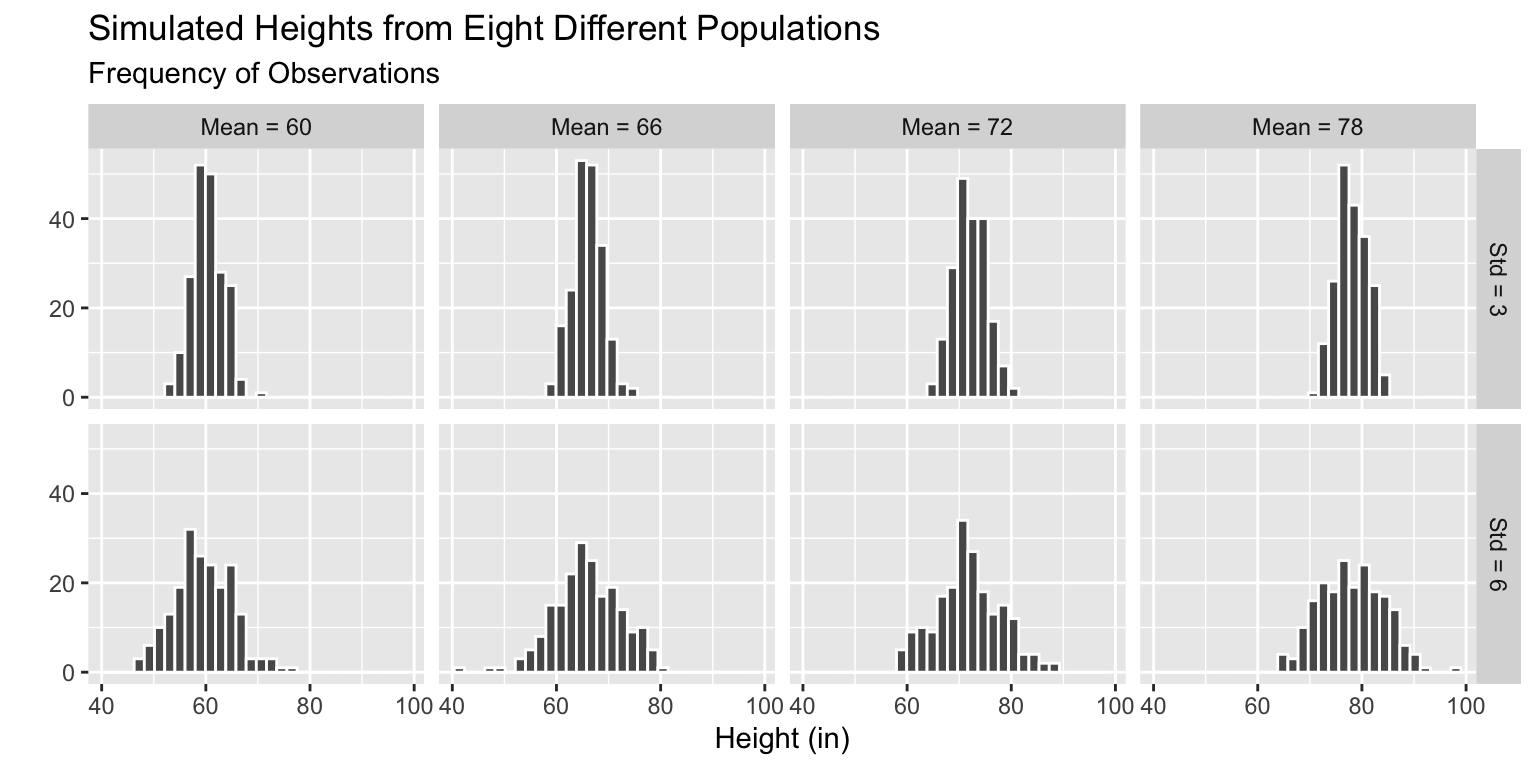
Plot the samples simulated from each population.

Code
fake_ht_data |> 
  mutate(across(.cols = mean_ht:std_ht, 
                .fns = ~as.character(.x)), 
         mean_ht = fct_recode(mean_ht, 
                              `Mean = 60` = "60", 
                              `Mean = 66` = "66", 
                              `Mean = 72` = "72", 
                              `Mean = 78` = "78"), 
         std_ht = fct_recode(std_ht, 
                             `Std = 3` = "3", 
                             `Std = 6` = "6")
         ) |> 
  ggplot(mapping = aes(x = ht)) +
  geom_histogram(color = "white") +
  facet_grid(std_ht ~ mean_ht) +
  labs(x = "Height (in)",
       y = "",
       subtitle = "Frequency of Observations",
       title = "Simulated Heights from Eight Different Populations")
Communicating Findings from Statistical Computing

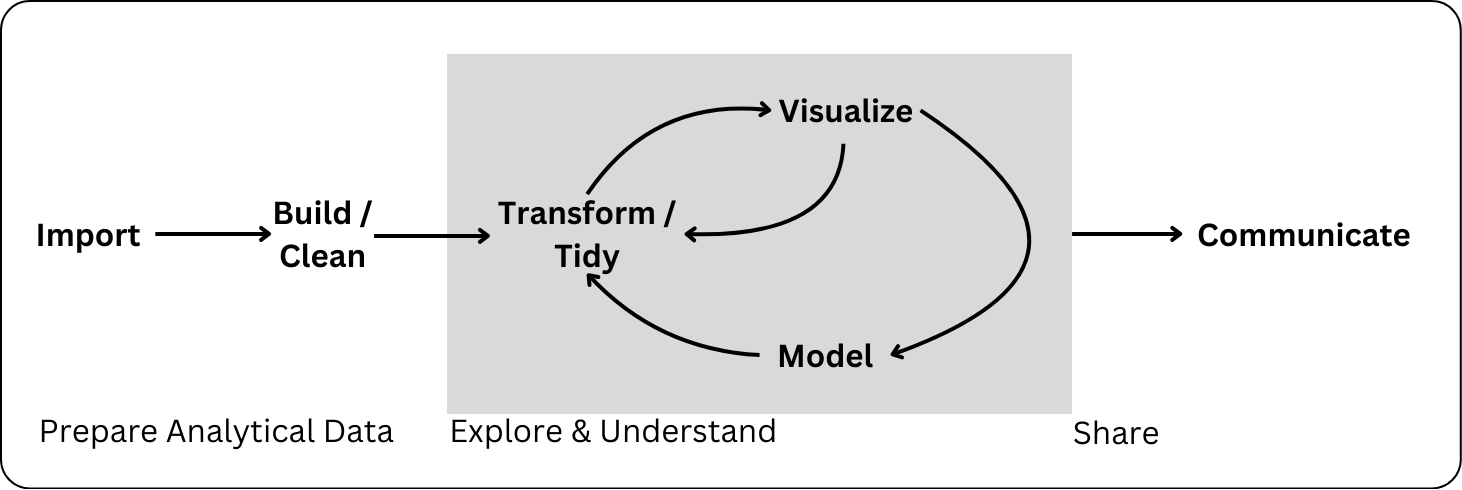
Remember the Data Science Process

Communicating about your analysis and findings is a key element of statistical computing.

Describing data

  • Data source(s)
  • Observational unit / level (e.g. county and year)
  • Overview of what is included (e.g. demographic incormation and weekly median childcare costs for each county and year)
  • Years or geographies included (e.g. 2008-2018, CA only)

Describing data cleaning

  • What does the audience need to know about any choices / decisions that you make while cleaning the data?
    • how did you handle missing data?
    • how did you define variables?
    • did you drop any observations? How many and why?
  • This doesn’t include
    • discussing specific file, variable, or function names
    • data cleaning that has no impact on interpretating the resulting analysis
      • e.g. changing the type of a variable

Describing data cleaning

Which is clearer to a general audience?:

In this analysis, we use data from the US Department of Labor which includes a variety of measurements of a state’s minimum wage for US states and territories by year. We additionally include information from a dataset provided by the Harvard Dataverse on state party leanings by year. Our analysis includes the years 1976 - 2020 and the 50 US states.

In this analysis, we use inner_join() to join us-party-data.csv and us-minimum-wage-data.csv by year and state.

PA 8.2: Instrument Con

Work with statistical distributions and iterating random processes to determine if an instrument salesman is lying.

–>

Lab 8: Data Frame Functions and Simulation

To do…

  • PA 8.2: Instrument Con
    • Due Friday 5/22 at 11:59pm.
  • Project Checkpoint 3
    • Due Friday 5/22 at 11:59pm.
  • Lab 8: Data Frame Functions and Simulation
    • Due Tuesday 5/26 at 11:59pm.
  • Required Reading
    • Review all material from this week for the group quiz Wed 5/27!

See you in a week!

Enjoy the long weekend! A reminder that we do not have class on Monday 5/25.